Mixed pipeline
One SMTP path
Marketing blast
Spam folder
Newsletter
Blocked too


01 message streams
A stream is one kind of bulk mail, such as campaigns or alerts. A domain belongs to one stream. Include X-Stream-Id when you send, and mail leaves from the verified domains in that stream.
A stream is one kind of bulk mail. Assign verified domains that are not already in another stream. If one campaign spikes bounces, those bounces stay with that stream.
A domain belongs to one stream. Bounces on that stream stay there.
A campaign list and an alert list can use different domains. The stream stats stay separate.
Campaigns and alerts can sit on different streams. A bounce problem on one stream stays with the domains assigned to it.
Stream-level stats show sent volume, delivery rate, and bounces per pipeline — not a blended average that hides problems.
Each stream reports sent, delivered, soft, hard, and unknown. Those counts stay with that stream.
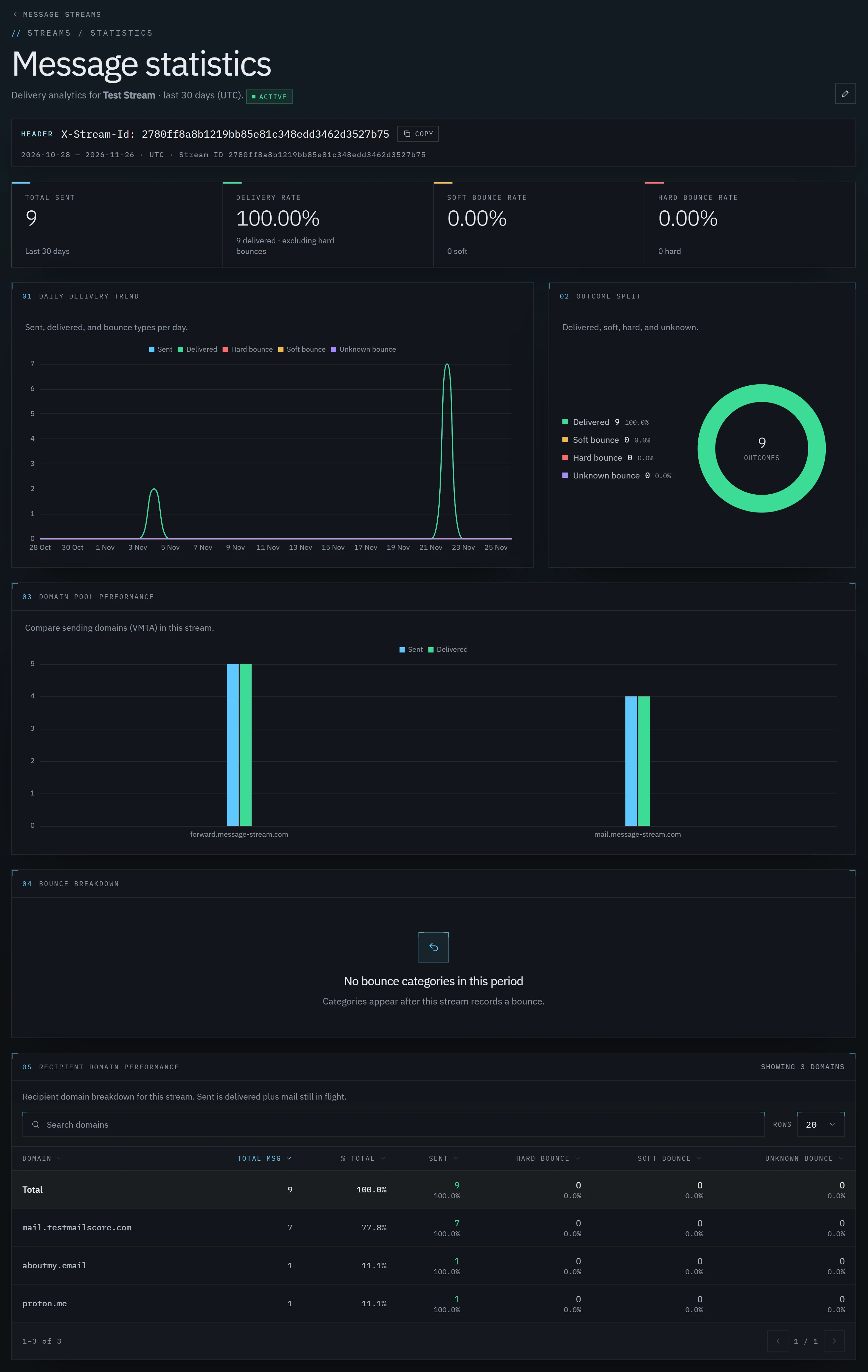
Every stream has its own statistics page. At the top: the stream's X-Stream-Id header with a copy button, and four totals — sent, delivery rate, soft bounce rate, and hard bounce rate. Below them, five cards:
Sent, delivered, and each bounce type for every day of the last 30 days.
Delivered, soft, hard, and unknown results as one share of everything the stream sent.
Sent and delivered for each sending domain in the stream, side by side.
The top bounce reasons, listed once the stream records a bounce.
Totals, share, and hard, soft, and unknown bounces for each domain you sent to. Search it and sort any column.
Map one or many domains to a single stream. Run a SaaS app and agency clients from one account with clean, branded sender signatures.
Create a stream per kind of bulk mail. A domain belongs to one stream, so one list does not share that domain with another stream.
Compare onboarding vs weekly digest streams side by side. Spot bounce spikes and complaint trends before they spread.
Trigger automations when a stream reports a bounce, complaint, or click. See API integration for webhook setup.
Name it for the mail — campaigns, newsletters, or alerts. You need at least one verified domain first.
Attach one or more verified domains to the stream's pool.
Point SMTP or API sends at the stream-specific credentials.
Review delivery stats and webhooks per stream in the dashboard.
hard_bounce events in your backend.Yes. Map one or many verified domains to a single stream for branded sending across business units — see multiple domain setup.
Each stream reports sent volume, delivery rate, bounces, and domain pool performance independently in the dashboard.
Add HTTPS webhook URLs in the dashboard. Events like bounces, complaints, and clicks fire only for traffic in that stream.
Stream segmentation and analytics are available on paid plans. Dedicated IPs are optional and do not change the monthly volume. Start on the free plan to test SMTP, then upgrade on plans.
Put each kind of bulk mail on its own stream. DNS setup is the generated records, with the proxy off.
We accept cryptocurrency (USDT, USDC, BTC, ETH and more).