Real-time performance
Live delivery rates, response times, and bounce rates during active campaigns — act before reputation damage spreads.


01 analytics & reporting
Monitor delivery rates, bounces, opens, and security events as they happen — plus historical reports, bounce log exports, and ESP-specific breakdowns. Included on every paid plan.
Analytics are built into your dashboard — no separate reporting add-on. View account-wide stats or filter by Message Stream and domain pool.
Live delivery rates, response times, and bounce rates during active campaigns — act before reputation damage spreads.
Sent, delivered, opened, and bounced mail with trend charts. Spot patterns across days and streams.
Failed logins, suspicious activity, and threat signals to protect your SMTP account and sender reputation.
See where recipients engage and how Gmail, Outlook, and Yahoo each perform for your mail.
Real-time analytics shows delivery status the moment it happens — not after an overnight export. Track sends from dispatch through bounces and complaints, then download bounce logs as CSV to clean your lists.
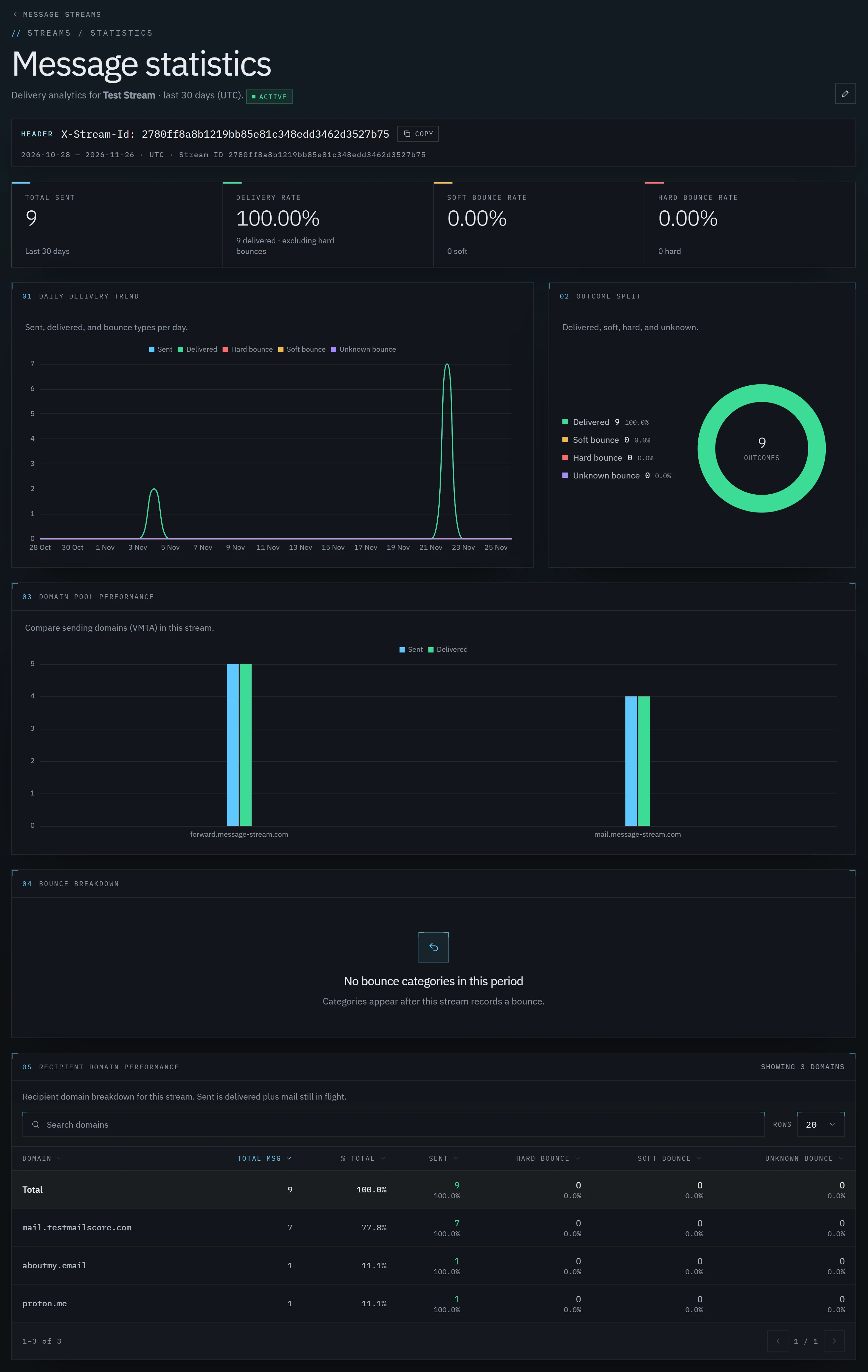
This is a stream's statistics page. It opens with the stream's X-Stream-Id header and four totals — sent, delivery rate, soft bounce rate, and hard bounce rate — then five cards cover the last 30 days:
Sent, delivered, and each bounce type for every day of the last 30 days.
Delivered, soft, hard, and unknown results as one share of everything the stream sent.
Sent and delivered for each sending domain in the stream, side by side.
The top bounce reasons, listed once the stream records a bounce.
Totals, share, and hard, soft, and unknown bounces for each domain you sent to. Search it and sort any column.
Download hard and soft bounces as CSV. Remove dead addresses quickly to protect deliverability.
Distinguish permanent failures from temporary deferrals so you fix list quality without over-pruning.
Data-driven tweaks improve deliverability — pair with the Mail Tester before large sends.
Catch anomalies early before they become account compromises or blacklist listings.
Adjust routing rules and stream volume based on live bounce and complaint data.
Click tracking rewrites links in your HTML emails so opens and clicks register in your dashboard — paired with Message Streams for per-campaign reporting.
Use your own subdomain for click redirects to build link reputation instead of generic shorteners.
Stream stats are sent, delivered, hard bounce, and delivery rate. Newsletter opens and clicks are a separate 30-day count.
Excessive redirects and unknown tracking domains can trigger spam filters. Use a branded tracking domain, limit redirect hops, and test with the Mail Tester before large campaigns.
Monitoring dashboard, blacklist checks, DNS checkups, and chat support. 1,000,000 messages a month starts from €120 on the shared plan. Dedicated is that volume plus your own IPs.
We accept cryptocurrency (USDT, USDC, BTC, ETH and more).